Excellent productivity app for Mac
Growly Notes is an effective productivity tool for Mac that lets you capture just about anything all in one place. It's a great tool for organizing research projects, trips, to-do lists, or journals. In addition, its equally competent at creating scrapbooks of random images, web links and video clips. If you need a slick productivity app without a big outlay, then Growly Notes is a very good choice.
Top Recommended Alternative

Cut and save almost anything
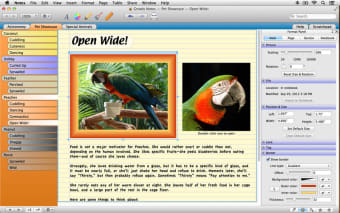
The great strength of Growly Notes is that it can contain almost anything, including formatted text, images, movies, audio clips, PDF files, tables, lists, web and file links, and drawings you create in Notes. You can place things anywhere so you don't have to worry about inflexible templates or rigid rules. You can separate ideas and brainstorming sessions into tabs which you can navigate very easily.
It's impressive that Growly Notes offers for free many of the features of a highly polished application like Curio. Growly comes amazingly close to MS OneNote in many aspects with the bonus of a slick OS X interface of course. However, some of the more advanced features of OneNote - such as integration with OneNote web app and syncing with Outlook aren't possible in Growly Notes. However, the developer GrowlyBird plans to release an iPad of Growly Notes late in 2014, which will be able to sync with the Mac version.
A great all-round productivity app
Growly Notes is perfect for mind-mapping, note-taking and brainstorming.
Changes
New features include syncing between computers, better text handling, improved audio/video recording, the ability to annotate PDFs, and a completely updated UI. There are also dozens of other new and improved features.








.png)